REST API Endpoints
List Devices
GET endpoint (previous /initialize endpoint) that returns the list of payment terminals (physical devices + Virtual Terminal if MOTO is enabled) associated with the merchant account. Use this to display available terminals to the merchant or to retrieve device information needed for other operations. A merchant can have multiple API keys, all granting the same access to the merchant's devices, requests auths and Analytics credentials too. API keys are merchant-specific and are not shared between merchants.
Parameters
| Parameter | Notes |
|---|---|
Header: ApiKeyCloud Required String | Api key used to authenticate the merchant. (merchant-specific and are not shared between merchants) |
Returns
| Response |
|---|
| List of Device objects. |
Code Example
Requests
- Request
curl -X GET \
 -H "ApiKeyCLoud: MeRcHaNt-ApIkEy" \
 "https://cloud.handpoint.com/devices" (production)
 "https://cloud.handpoint.io/devices" (development)
Responses
- 200 OK
[
  {
    "merchant_id_alpha": "merchantID",
    "serial_number": "1850025030",
    "ssk": "A1B2C3D4E5F60718293A4B5C6D7E8F901A2B3C4D5E6F7890ABCDEF0123456789",
    "terminal_type": "PAXA920PRO"
  }
]
Both serial_number and terminal_type values will be a required combination for requests sent to the terminal.
Terminal Operations
The following endpoints require a direct request to a physical payment terminal.
/transactions
Transactions
POST endpoint used to send a financial operation to the payment terminal. The transaction type to be executed (sale, refund etc.) is defined in the operation field of the request body.
Parameters
| Parameter | Notes |
|---|---|
Header: ApiKeyCloud Required String | Api key used to authenticate the merchant. (UNIQUE per Merchant) |
Request Body: Transaction Request Required TransactionRequest | Object containing the transaction request information. |
Returns
| Response | Response Code |
|---|---|
| Transaction Accepted | The response code 202 is received from the API if the transaction was successfully sent to the payment terminal. |
| BadRequest DeviceIsBusy Error | The response code 400 with error 1001 is received from the API if the payment terminal is already processing a transaction. |
| BadRequest DeviceNotResponding Error | The response code 400 with error 1002 is received from the API if the payment terminal is offline. |
| BadRequest CancelOperationNotAllowed Error | The response code 400 with error 1003 is received from the API if the stopCurrentTransaction operation cannot be executed. A transaction can only be cancelled at specific steps of the transaction, while waiting for the card to be inserted or on PIN screen. |
Code Example
Make sure that your transactionReference is unique per request, and change it for every new request attempt (even if the request contains the same values re-attempt). This will improve logs and could help troubleshooting.
transactionReference should only be included in original operations (Sale, Pre-Auth, MOTO Sale, or an unlinked MOTO Refund). Linked operations — such as Refund, Reversal, Pre-Auth Increase/Capture — should not include a transactionReference. These operations will be automatically logged under the transactionReference of the original transaction.
Requests
- Sale (no callback)
- Sale (with callback)
- Refund
- Unlinked Refund
- Reversal
curl -X POST \
 -H "ApiKeyCLoud: MeRcHaNt-ApIkEy" \
 -H "Content-Type: application/json" \
 -d '{
     "operation":"sale",
     "amount":"10000",
     "currency":"EUR",
     "terminal_type":"PAXA920",
     "serial_number":"1547854757",
     "customerReference":"op15248",
     "transactionReference": "2bfde1fc-23b1-4c67-93d9-1d4a557f4d4f"
 }' \
 "https://cloud.handpoint.com/transactions" (production)
 "https://cloud.handpoint.io/transactions" (development)
curl -X POST \
 -H "ApiKeyCLoud: MeRcHaNt-ApIkEy" \
 -H "Content-Type: application/json" \
 -d '{
     "operation":"sale",
     "amount":"10000",
     "currency":"EUR",
     "terminal_type":"PAXA920",
     "serial_number":"1547854757",
     "customerReference":"op15248",
     "callbackUrl":"https://url.where.the.result.is.served.com",
     "token":"2bfde1fc-23b1-4c67-93d9-1d4a557f4d4f",
     "transactionReference": "2bfde1fc-23b1-4c67-93d9-1d4a557f4d4f"
 }' \
 "https://cloud.handpoint.com/transactions" (production)
 "https://cloud.handpoint.io/transactions" (development)
curl -X POST \
 -H "ApiKeyCLoud: MeRcHaNt-ApIkEy" \
 -H "Content-Type: application/json" \
 -d '{
     "operation":"refund",
     "amount":"10000",
     "currency":"EUR",
     "terminal_type":"PAXA920",
     "serial_number":"1547854757",
     "originalTransactionId":"2bfde1fc-23b1-4c67-93d9-1d4a557f4d4f"
 }' \
 "https://cloud.handpoint.com/transactions" (production)
 "https://cloud.handpoint.io/transactions" (development)
The amount field can be a partial or full refund. The amount specified is what will be refunded (in minor units, e.g. "10000" = 100.00). transactionReference should not be included — the refund will be linked to the transactionReference of the original transaction.
curl -X POST \
 -H "ApiKeyCLoud: MeRcHaNt-ApIkEy" \
 -H "Content-Type: application/json" \
 -d '{
     "operation":"refund",
     "amount":"10000",
     "currency":"EUR",
     "terminal_type":"PAXA920",
     "serial_number":"1547854757",
     "transactionReference": "9f3a1b2c-44d5-67e8-f901-23456789abcd"
 }' \
 "https://cloud.handpoint.com/transactions" (production)
 "https://cloud.handpoint.io/transactions" (development)
An unlinked refund is not tied to a previous transaction — no originalTransactionId is provided. Because it is an original operation, a unique transactionReference (UUID v4) must be included.
curl -X POST \
 -H "ApiKeyCLoud: MeRcHaNt-ApIkEy" \
 -H "Content-Type: application/json" \
 -d '{
     "operation":"refundReversal",
     "amount":"10000",
     "currency":"EUR",
     "terminal_type":"PAXA920",
     "serial_number":"1547854757",
     "originalTransactionId":"2bfde1fc-23b1-4c67-93d9-1d4a557f4d4f"
 }' \
 "https://cloud.handpoint.com/transactions" (production)
 "https://cloud.handpoint.io/transactions" (development)
amount and currency are required fields. For acquirers that support partial reversals, the specified amount will be reversed. For all other acquirers, the full original amount is reversed regardless of the amount sent (must be between 0 and 999999999999). transactionReference should not be included — the reversal will be linked to the transactionReference of the original transaction.
Responses
- 202 (no callback)
- 202 (with callback)
- 400 DeviceIsBusy
{
  "transactionResultId": "0821032398-1628774190395",
  "statusMessage": "Operation Accepted",
  "transactionReference": "00000000-0000-0000-0000-000000000000"
}
{
  "statusMessage": "Operation Accepted",
  "transactionReference": "00000000-0000-0000-0000-000000000000"
}
{
  "error": {
    "statusCode": 400,
    "name": "BadRequestError",
    "message": {
      "error": 1001,
      "message": "The device is busy"
    }
  }
}
Transaction Result Recovery
TransactionResultRecovery
The terminal has a transaction recovery loop to automatically send back the pending TransactionResult to the callback URL in case it becomes unreachable (network issue or server down).
For the first 100 seconds after a transaction is completed, a background thread will attempt to deliver the result every 5 seconds. If the server is still unreachable after the first 100 seconds, the retry loop turns into an exponential increment to the power of 2 (8s-16s-32s etc…). The recovery loop is reinitialized every time the Handpoint application is restarted or the startRecovery method is triggered. The Transaction Result received through the transaction recovery loop will have the recoveredTransaction field set to true.
All 2XXs http response codes from the callbackUrl are valid to notify the payment terminal of a successful delivery of the result.
Returns
| Parameter | Notes |
|---|---|
| Transaction Result | The Transaction Result is delivered to the callback URL from the Transaction Request. |
/transaction-result/{transactionResultId}
TransactionResultRetrieval
GET endpoint used to retrieve transaction results from the payment terminal. In case you do not provide a callbackURL and token in the transaction request, the terminal will post the transaction result to an Handpoint internal API which can be queried in order for your software to fetch the transaction result. If you are running a server to receive results and pass a callback URL and token as part of the transaction request you do not need to query this endpoint.
Parameters
| Parameter | Notes |
|---|---|
Header: ApiKeyCloud Required String | Api key used to authenticate the merchant. (UNIQUE per Merchant) |
Path parameter: transactionResultId Required String | The transactionResultId is a unique transaction id delivered immediately as a response to your transaction request. It can be used to query for a transaction result. |
Returns
| Response | Response Code |
|---|---|
| No Content | Response code 204. The transactionResultId was found in the database but there is no transaction result associated yet. This status will be retrieved while the transaction is ongoing and the transaction result has not been delivered yet. |
| OK | Response code 200 + Transaction Result. The transactionResultId was found in the database and the associated Transaction Result object is delivered. |
| Not Found | Response code 404. The transactionResultId was not found in the database. |
Code Example
Requests
- Request
curl -X GET \\
 -H "ApiKeyCLoud: MeRcHaNt-ApIkEy" \\
 "https://cloud.handpoint.com/transaction-result/1850025030-1776238708721" (production)
 "https://cloud.handpoint.io/transaction-result/1850025030-1776238708721" (development)
Responses
- 200 OK
- 204 No Content
- 404 Not Found
{
    "_statusMessage": "TEXT_IRT_00",
    "accountType": "",
    "aid": "A0000000031010",
    "applicationLabel": "VISA CLASICA",
    "arc": "0000",
    "authorisationCode": "123456",
    "balance": null,
    "batchNumber": "123",
    "budgetNumber": "",
    "cardEntryType": "ICC",
    "cardHolderName": "",
    "cardLanguagePreference": "es_ES",
    "cardSchemeName": "Visa",
    "cardToken": "",
    "cardTypeId": "************0936",
    "chipTransactionReport": "",
    "currency": "EUR",
    "customData": "",
    "customerReceipt": "https://receipts.handpoint.com/receipts/1abe8dc0-389e-11f1-8672-a1e0852a3198/customer.html",
    "customerReference": "",
    "deviceStatus": {
        "applicationName": "Payments",
        "applicationVersion": "20.4.12.1",
        "batteryCharging": "Not Charging",
        "batteryStatus": "80",
        "batterymV": "3922",
        "bluetoothName": "PAXA920PRO",
        "externalPower": "USB",
        "serialNumber": "1850025030",
        "statusMessage": ""
    },
    "dueAmount": 0,
    "errorMessage": "",
    "expiryDateMMYY": "1027",
    "finStatus": "AUTHORISED",
    "iad": "06011203A00000",
    "issuerResponseCode": "00",
    "maskedCardNumber": "************0936",
    "merchantAddress": "373 Douglas Ave. 2671 Malaga",
    "merchantName": "im25merchant",
    "merchantReceipt": "https://receipts.handpoint.com/receipts/1abe8dc0-389e-11f1-8672-a1e0852a3198/merchant.html",
    "metadata": null,
    "mid": "12345678",
    "moneyRemittanceOptions": null,
    "multiLanguageErrorMessages": {},
    "multiLanguageStatusMessages": {},
    "originalEFTTransactionID": "",
    "paymentScenario": "CHIPCONTACTLESS",
    "requestedAmount": 300,
    "rrn": "0000415558180",
    "signatureUrl": "",
    "statusMessage": "Aprobado o completado con éxito",
    "tenderType": "CREDIT",
    "tid": "50025030",
    "tipAmount": 0,
    "totalAmount": 300,
    "transactionID": "1abe8dc0-389e-11f1-8672-a1e0852a3198",
    "transactionOrigin": "CLOUD",
    "transactionReference": "f147c2e7-f445-4af8-9e11-ae035320ade3",
    "tsi": "",
    "tvr": "0000000000",
    "type": "SALE",
    "unMaskedPan": "",
    "verificationMethod": "NOT_REQUIRED",
    "efttimestamp": 1776238711000,
    "efttransactionID": "1abe8dc0-389e-11f1-8672-a1e0852a3198",
    "tipPercentage": 0,
    "recoveredTransaction": false
}
Transaction is still in progress. Poll again after a few seconds.
The transactionResultId was not found in the database.
signatureUrl: In case the signature can not be updated to the Handpoint servers and an URL is not generated, the terminal will send back the image binary in base64 format to your software. It is important to be able to support both the URL and the image binary format.
customerReceipt and merchantReceipt: The receipts are usually received as URLs in the transaction result from the terminal. Please note that if the terminal is not able to upload the receipt to the Handpoint cloud servers and an URL is not generated then the HTML formatted receipt will be delivered to your software. It is important to be able to manage both formats.
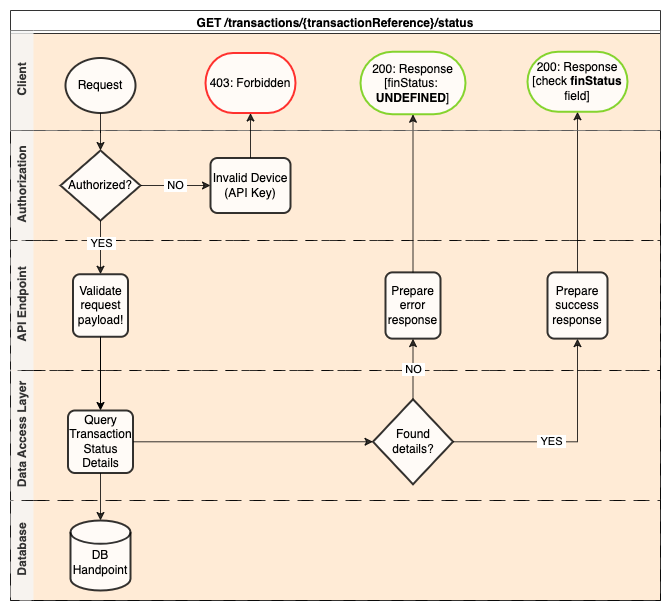
/transactions/{transactionReference}/status
This endpoint does not use https://cloud.handpoint.(io/com)/ as a base URL, it uses https://transactions.handpoint.(io/com)/
The https://transactions.handpoint.com/transactions/\{transactionReference\}/status endpoint is a RESTful API endpoint designed to retrieve the status of the first transaction associated with a given transactionReference. This endpoint returns the status of the initial transaction linked to the reference, reflecting the current state of that transaction.The transactionReference is a unique value that you need to generate and pass in the original transaction request.
The main transaction result FinancialStatus that can be returned as a response to this method are the following ones:
- AUTHORISED - Transaction was successful.
- DECLINED - Transaction was declined.
- UNDEFINED (NOT FOUND) - The transaction does not exist in the Handpoint gateway. If this status is returned within 90s of the start of a transaction, there could be a chance that the cardholder has not inserted, swiped or tapped his card yet on the terminal and the Handpoint gateway might soon receive the transaction. If the
UNDEFINEDstatus is returned after 90s, it means that the transaction processed has not reached the Handpoint gateway and it will NOT be charged. - IN_PROGRESS - The transaction has been received by the gateway but the outcome is not known yet, try again after a few seconds.
- REFUNDED - Transaction was refunded.
Parameters
| Parameter | Notes |
|---|---|
Header: ApiKeyCloud Required String | Api key used to authenticate the merchant. (UNIQUE per Merchant) |
Path parameter: transactionReference Required String | The transactionReference is a UNIQUE UUID v4 generated by you and added as a parameter to the initial financial request. It can then be used to query the transaction status endpoint. |
Handpoint does not verify that the transactionReference values sent on every request are UNIQUE.
It's our recommendation that a new value is created and sent for every request attempt.
Responses
| Response | Response Code |
|---|---|
| OK | Response code 200 + Transaction Result. There are two possible outcomes: - The transactionReference was found in the database and the associated Transaction Result object is delivered. By checking the financial status field you will be able to know the status of the transaction at the time of the query. - The transactionReference was not found in the Handpoint gateway. The financial status received in this case will be UNDEFINED (NOT FOUND) |
| Unauthorized | Response code 401. The client request has not been completed because it lacks valid authentication credentials for the requested resource. Please check your API Key is correct for this transactionReference. |
| Forbidden | Response code 403. Authentication was unsuccessful. Please check your API Key is valid. |
Code Example
Requests
- Request
curl -X GET \\
  -H "ApiKeyCLoud: MeRcHaNt-ApIkEy" \\
  "https://transactions.handpoint.com/transactions/b25381cc-2396-42b5-94cd-8f8b3112de0e/status" (production)
  "https://transactions.handpoint.io/transactions/b25381cc-2396-42b5-94cd-8f8b3112de0e/status" (development)
Responses
- 200 OK
{
    "aid": "A0000000031010",
    "arc": "00",
    "iad": "06011203A00000",
    "tsi": "",
    "tvr": "0000000000",
    "cardEntryType": "ICC",
    "cardLanguagePreference": "6573",
    "currency": "USD",
    "type": "SALE",
    "tipAmount": 0,
    "totalAmount": 3000,
    "requestedAmount": 3000,
    "dueAmount": 0,
    "tipPercentage": 0,
    "efttimestamp": 1775047061554,
    "originalEFTTransactionID": "",
    "paymentScenario": "CHIPCONTACTLESS",
    "verificationMethod": "UNDEFINED",
    "authorisationCode": "010119",
    "cardSchemeName": "VISA",
    "cardToken": "",
    "maskedCardNumber": "************0936",
    "cardTypeId": "",
    "customerReference": "",
    "efttransactionID": "605597c0-2dc7-11f1-af50-e16c4b0ae383",
    "transactionID": "605597c0-2dc7-11f1-af50-e16c4b0ae383",
    "errorMessage": "",
    "expiryDateMMYY": "1027",
    "issuerResponseCode": "00",
    "batchNumber": "",
    "rrn": "513815902180",
    "tenderType": "CREDIT",
    "unMaskedPan": "",
    "holdAmount": 0,
    "increaseAmount": 0,
    "capturedAmount": 0,
    "merchantAddress": "",
    "merchantName": "",
    "mid": "",
    "cardHolderName": "",
    "chipTransactionReport": "",
    "customerReceipt": "",
    "merchantReceipt": "",
    "signatureUrl": "",
    "statusMessage": "",
    "tid": "",
    "transactionReference": "b25381cc-2396-42b5-94cd-8f8b3112de0e",
    "transactionOrigin": "",
    "finStatus": "AUTHORISED"
}
/transactions/{transactionReference}/status/{selector}
This endpoint does not use https://cloud.handpoint.(io/com)/ as a base URL, it uses https://transactions.handpoint.(io/com)/
The https://transactions.handpoint.io/transactions/\{transactionReference\}/status/\{selector\} endpoint is a RESTful API that retrieves the status of transactions associated with a given transactionReference. The \{selector\} path parameter allows you to specify whether you want to retrieve the status of a specific transaction by its index or retrieve all transactions associated with the transactionReference.
Selector Values
| Selector | Description |
|---|---|
| all | Returns the status of all transactions associated with the given transactionReference. |
| first | Returns the status of the first transaction associated with the transactionReference. |
| last | Returns the status of the last transaction associated with the transactionReference. |
| {index} | Returns the status of a specific transaction identified by its 1-based index in the sequence of transactions associated with the transactionReference. For example, 1 for the first transaction, 2 for the second, and so on. |
Important Note: The finStatus field for the first transaction reflects its current status. In contrast, for subsequent transactions, the finStatus reflects the original status at the time of processing. For example, if a refund is later reversed, the refund transaction will still show as AUTHORISED.
Parameters
| Parameter | Description |
|---|---|
Header: ApiKeyCloud Required String | Api key used to authenticate the merchant. (UNIQUE per Merchant) |
Path: transactionReference Required String | The transactionReference is a UNIQUE UUID v4 generated by you and added as a parameter to the initial financial request. It is used to query the transaction status. |
Path: selector Required String | Specifies whether to return all transactions or a specific transaction by index. |
Handpoint does not verify that the transactionReference values sent on every request are UNIQUE.
It's our recommendation that a new value is created and sent for every request attempt.
Responses
| Response | Response Code |
|---|---|
| 200 OK | The request was successful, and the transaction status(es) are returned in the response. |
| 404 Not Found | The specified transactionReference or selector does not exist. |
| 403 Forbidden | Authentication failed. Please check that your API Key is valid. |
Code Example
Requests
- Retrieve All Transactions
- Retrieve Specific Transaction
curl -X GET \
-H "ApiKeyCloud: your-api-key" \
"https://transactions.handpoint.io/transactions/123e4567-e89b-12d3-a456-426614174000/status/all"
curl -X GET \
-H "ApiKeyCloud: your-api-key" \
"https://transactions.handpoint.io/transactions/123e4567-e89b-12d3-a456-426614174000/status/3"
Responses
- 200 OK (All Transactions)
- 200 OK (Single Record by Index)
- 200 OK (Last Transaction)
[
    {
        "aid": "A0000000031010",
        "arc": "00",
        "iad": "06011203A00000",
        "tsi": "",
        "tvr": "0000000000",
        "cardEntryType": "ICC",
        "cardLanguagePreference": "6573",
        "currency": "EUR",
        "type": "SALE",
        "tipAmount": 0,
        "totalAmount": 300,
        "requestedAmount": 300,
        "dueAmount": 0,
        "tipPercentage": 0,
        "efttimestamp": 1776238711661,
        "originalEFTTransactionID": "",
        "paymentScenario": "CHIPCONTACTLESS",
        "verificationMethod": "UNDEFINED",
        "authorisationCode": "123456",
        "cardSchemeName": "Visa",
        "cardToken": "",
        "maskedCardNumber": "************0936",
        "cardTypeId": "",
        "customerReference": "",
        "efttransactionID": "1abe8dc0-389e-11f1-8672-a1e0852a3198",
        "transactionID": "1abe8dc0-389e-11f1-8672-a1e0852a3198",
        "errorMessage": "",
        "expiryDateMMYY": "1027",
        "issuerResponseCode": "00",
        "batchNumber": "",
        "rrn": "0000415558180",
        "tenderType": "CREDIT",
        "unMaskedPan": "",
        "holdAmount": 0,
        "increaseAmount": 0,
        "capturedAmount": 0,
        "merchantAddress": "",
        "merchantName": "",
        "mid": "",
        "cardHolderName": "",
        "chipTransactionReport": "",
        "customerReceipt": "",
        "merchantReceipt": "",
        "signatureUrl": "",
        "statusMessage": "",
        "tid": "",
        "transactionReference": "f147c2e7-f445-4af8-9e11-ae035320ade3",
        "transactionOrigin": "",
        "finStatus": "AUTHORISED"
    },
    {
        "aid": "A0000000031010",
        "arc": "",
        "iad": "06011203800000",
        "tsi": "",
        "tvr": "0000000000",
        "cardEntryType": "ICC",
        "cardLanguagePreference": "6573",
        "currency": "EUR",
        "type": "REFUND",
        "tipAmount": 0,
        "totalAmount": 300,
        "requestedAmount": 300,
        "dueAmount": 0,
        "tipPercentage": 0,
        "efttimestamp": 1776245491451,
        "originalEFTTransactionID": "1abe8dc0-389e-11f1-8672-a1e0852a3198",
        "paymentScenario": "CHIPCONTACTLESS",
        "verificationMethod": "UNDEFINED",
        "authorisationCode": "123456",
        "cardSchemeName": "Visa",
        "cardToken": "",
        "maskedCardNumber": "************0936",
        "cardTypeId": "",
        "customerReference": "",
        "efttransactionID": "e3dbda50-38ad-11f1-909c-f50efeae2190",
        "transactionID": "e3dbda50-38ad-11f1-909c-f50efeae2190",
        "errorMessage": "",
        "expiryDateMMYY": "1027",
        "issuerResponseCode": "",
        "batchNumber": "",
        "rrn": "",
        "tenderType": "CREDIT",
        "unMaskedPan": "",
        "holdAmount": 0,
        "increaseAmount": 0,
        "capturedAmount": 0,
        "merchantAddress": "",
        "merchantName": "",
        "mid": "",
        "cardHolderName": "",
        "chipTransactionReport": "",
        "customerReceipt": "",
        "merchantReceipt": "",
        "signatureUrl": "",
        "statusMessage": "",
        "tid": "",
        "transactionReference": "f147c2e7-f445-4af8-9e11-ae035320ade3",
        "transactionOrigin": "",
        "finStatus": "AUTHORISED"
    },
    {
        "aid": "",
        "arc": "",
        "iad": "",
        "tsi": "",
        "tvr": "",
        "cardEntryType": "UNDEFINED",
        "cardLanguagePreference": "",
        "currency": "EUR",
        "type": "REVERSAL",
        "tipAmount": 0,
        "totalAmount": 300,
        "requestedAmount": 300,
        "dueAmount": 0,
        "tipPercentage": 0,
        "efttimestamp": 1776245504454,
        "originalEFTTransactionID": "e3dbda50-38ad-11f1-909c-f50efeae2190",
        "paymentScenario": "UNKNOWN",
        "verificationMethod": "UNDEFINED",
        "authorisationCode": "123456",
        "cardSchemeName": "Visa",
        "cardToken": "",
        "maskedCardNumber": "************0936",
        "cardTypeId": "",
        "customerReference": "",
        "efttransactionID": "eb439ad0-38ad-11f1-8672-a1e0852a3198",
        "transactionID": "eb439ad0-38ad-11f1-8672-a1e0852a3198",
        "errorMessage": "",
        "expiryDateMMYY": "1027",
        "issuerResponseCode": "",
        "batchNumber": "",
        "rrn": "",
        "tenderType": "CREDIT",
        "unMaskedPan": "",
        "holdAmount": 0,
        "increaseAmount": 0,
        "capturedAmount": 0,
        "merchantAddress": "",
        "merchantName": "",
        "mid": "",
        "cardHolderName": "",
        "chipTransactionReport": "",
        "customerReceipt": "",
        "merchantReceipt": "",
        "signatureUrl": "",
        "statusMessage": "",
        "tid": "",
        "transactionReference": "f147c2e7-f445-4af8-9e11-ae035320ade3",
        "transactionOrigin": "",
        "finStatus": "AUTHORISED"
    }
]
{
    "aid": "",
    "arc": "",
    "iad": "",
    "tsi": "",
    "tvr": "",
    "cardEntryType": "UNDEFINED",
    "cardLanguagePreference": "",
    "currency": "EUR",
    "type": "REVERSAL",
    "tipAmount": 0,
    "totalAmount": 300,
    "requestedAmount": 300,
    "dueAmount": 0,
    "tipPercentage": 0,
    "efttimestamp": 1776245504454,
    "originalEFTTransactionID": "e3dbda50-38ad-11f1-909c-f50efeae2190",
    "paymentScenario": "UNKNOWN",
    "verificationMethod": "UNDEFINED",
    "authorisationCode": "123456",
    "cardSchemeName": "Visa",
    "cardToken": "",
    "maskedCardNumber": "************0936",
    "cardTypeId": "",
    "customerReference": "",
    "efttransactionID": "eb439ad0-38ad-11f1-8672-a1e0852a3198",
    "transactionID": "eb439ad0-38ad-11f1-8672-a1e0852a3198",
    "errorMessage": "",
    "expiryDateMMYY": "1027",
    "issuerResponseCode": "",
    "batchNumber": "",
    "rrn": "",
    "tenderType": "CREDIT",
    "unMaskedPan": "",
    "holdAmount": 0,
    "increaseAmount": 0,
    "capturedAmount": 0,
    "merchantAddress": "",
    "merchantName": "",
    "mid": "",
    "cardHolderName": "",
    "chipTransactionReport": "",
    "customerReceipt": "",
    "merchantReceipt": "",
    "signatureUrl": "",
    "statusMessage": "",
    "tid": "",
    "transactionReference": "f147c2e7-f445-4af8-9e11-ae035320ade3",
    "transactionOrigin": "",
    "finStatus": "AUTHORISED"
}
{
    "aid": "",
    "arc": "",
    "iad": "",
    "tsi": "",
    "tvr": "",
    "cardEntryType": "UNDEFINED",
    "cardLanguagePreference": "",
    "currency": "EUR",
    "type": "REVERSAL",
    "tipAmount": 0,
    "totalAmount": 300,
    "requestedAmount": 300,
    "dueAmount": 0,
    "tipPercentage": 0,
    "efttimestamp": 1776245504454,
    "originalEFTTransactionID": "e3dbda50-38ad-11f1-909c-f50efeae2190",
    "paymentScenario": "UNKNOWN",
    "verificationMethod": "UNDEFINED",
    "authorisationCode": "123456",
    "cardSchemeName": "Visa",
    "cardToken": "",
    "maskedCardNumber": "************0936",
    "cardTypeId": "",
    "customerReference": "",
    "efttransactionID": "eb439ad0-38ad-11f1-8672-a1e0852a3198",
    "transactionID": "eb439ad0-38ad-11f1-8672-a1e0852a3198",
    "errorMessage": "",
    "expiryDateMMYY": "1027",
    "issuerResponseCode": "",
    "batchNumber": "",
    "rrn": "",
    "tenderType": "CREDIT",
    "unMaskedPan": "",
    "holdAmount": 0,
    "increaseAmount": 0,
    "capturedAmount": 0,
    "merchantAddress": "",
    "merchantName": "",
    "mid": "",
    "cardHolderName": "",
    "chipTransactionReport": "",
    "customerReceipt": "",
    "merchantReceipt": "",
    "signatureUrl": "",
    "statusMessage": "",
    "tid": "",
    "transactionReference": "f147c2e7-f445-4af8-9e11-ae035320ade3",
    "transactionOrigin": "",
    "finStatus": "AUTHORISED"
}
Device Control Commands
Note:
The following commands are available for all devices running Android SDK version 7.1006.0 or later.
Command Endpoint Format
All device control commands follow this endpoint structure:
https://cloud.handpoint.io/devices/\{deviceType\}/\{serialNumber\}/\{command\}
Where:
\{deviceType\}is the type of the device (e.g., PAXIM30)\{serialNumber\}is the serial number of the device (e.g., 1640013848)\{command\}is the specific command to execute
Common Parameters
All commands share these common parameters:
| Parameter | Notes |
|---|---|
Header: ApiKeyCloud Required String | Api key used to authenticate the merchant. (UNIQUE per Merchant) |
Header: Content-Type Required String | Must be set to application/json |
Common Response Codes
| Response Code | Description |
|---|---|
| 202 | Request accepted, command will be executed |
| 403 | Authentication failed |
| 422 | Invalid request |
| 400 | Invalid parameter value (when applicable) |
For the Commands to work properly, the Handpoint Payments App MUST be in Integrated Mode (enabled via Handpoint TMS and controlled by the merchant in the Handpoint Payments App Settings). Use the pingDevice operation to confirm the device is in Integrated Mode before you send these commands.
If you attempt to send one of these commands and the device is not yet in Integrated Mode, you may receive a 202 Accepted response but the command will not have been executed by the terminal.
Set Unattended Mode
POST /devices/\{deviceType\}/\{serialNumber\}/set-unattended-mode
Enables or disables unattended mode on the device. Unattended mode will disable the Bottom navigation bar containing the Home, back, recent buttons. The Payment screen will be the only visible screen in the Handpoint Payments App. (Settings, Hisotry and Analytic tabs will not be accessible)
Request Body Parameters
| Parameter | Type | Description |
|---|---|---|
status | boolean | true to enable unattended mode, false to disable |
Example Request
Requests
- Request
curl -X POST \
  -H "ApiKeyCloud: XXXXXXX-XXXXXXX-XXXXXXX-XXXXXXX" \
  -H "Content-Type: application/json" \
  -d '{
    "status": false
  }' \
  "https://cloud.handpoint.io/devices/PAXIM30/0000000000/set-unattended-mode"
Responses
- 202 Accepted
No response body is returned.
Set Locale
POST /devices/\{deviceType\}/\{serialNumber\}/set-locale
Sets the locale of the target device.
Request Body Parameters
| Parameter | Type | Description |
|---|---|---|
locale | string | IETF BCP 47 language tag (e.g., en_US). Two-letter language and country code. |
Response Codes
| Code | Description |
|---|---|
| 202 | The request is accepted and will be executed |
| 403 | Authentication failed |
| 422 | Invalid request |
Example Request
Requests
- Request
curl -X POST \
  -H "ApiKeyCloud: XXXXXXX-XXXXXXX-XXXXXXX-XXXXXXX" \
  -H "Content-Type: application/json" \
  -d '{
    "locale": "en_CA"
  }' \
  "https://cloud.handpoint.io/devices/PAXIM30/0000000000/set-locale"
Responses
- 202 Accepted
No response body is returned.
Set Password Protection
POST /devices/\{deviceType\}/\{serialNumber\}/set-password-protected
Enables or disables password protection on the device.
Request Body Parameters
| Parameter | Type | Description |
|---|---|---|
status | boolean | true to enable password protection, false to disable |
Response Codes
| Code | Description |
|---|---|
| 202 | The request is accepted and will be executed |
| 403 | Authentication failed |
| 422 | Invalid request |
Example Request
Requests
- Request
curl -X POST \
  -H "ApiKeyCloud: XXXXXXX-XXXXXXX-XXXXXXX-XXXXXXX" \
  -H "Content-Type: application/json" \
  -d '{
    "status": true
  }' \
  "https://cloud.handpoint.io/devices/PAXIM30/0000000000/set-password-protected"
Responses
- 202 Accepted
No response body is returned.
Reboot Device
POST /devices/\{deviceType\}/\{serialNumber\}/reboot
Reboots the device with an optional force parameter.
Request Body Parameters
| Parameter | Type | Description |
|---|---|---|
force | boolean | true to force reboot even during transaction, false to check status first |
Response Codes
| Code | Description |
|---|---|
| 202 | The request is accepted and will be executed |
| 403 | Authentication failed |
| 422 | Invalid request |
Example Request
Requests
- Request
curl -X POST \
  -H "ApiKeyCloud: XXXXXXX-XXXXXXX-XXXXXXX-XXXXXXX" \
  -H "Content-Type: application/json" \
  -d '{
    "force": false
  }' \
  "https://cloud.handpoint.io/devices/PAXIM30/0000000000/reboot"
Responses
- 202 Accepted
No response body is returned.
Set Screen Brightness
POST /devices/\{deviceType\}/\{serialNumber\}/set-screen-brightness
Sets the screen brightness levels.
Request Body Parameters
| Parameter | Type | Description |
|---|---|---|
minimumBrightnessLevel | integer | Value between 0 and 100 |
maximumBrightnessLevel | integer | Value between 0 and 100 |
Response Codes
| Code | Description |
|---|---|
| 202 | The request is accepted and will be executed |
| 403 | Authentication failed |
| 422 | Invalid request |
| 400 | Value is outside the valid range |
Example Request
Requests
- Request
curl -X POST \
  -H "ApiKeyCloud: XXXXXXX-XXXXXXX-XXXXXXX-XXXXXXX" \
  -H "Content-Type: application/json" \
  -d '{
    "minimumBrightnessLevel": 20,
    "maximumBrightnessLevel": 100
  }' \
  "https://cloud.handpoint.io/devices/PAXIM30/0000000000/set-screen-brightness"
Responses
- 202 Accepted
No response body is returned.
Set Reboot Time
This feature is only enabled for production devices.
POST /devices/\{deviceType\}/\{serialNumber\}/set-reboot-time
Sets the daily reboot time for the device. The actual reboot will occur at a random minute within the specified hour.
Request Body Parameters
| Parameter | Type | Description |
|---|---|---|
hour | integer | Hour of the day (0-23) when device should reboot |
If hour is set to 22, the device will reboot at a random time between 22:01 and 22:59.
Response Codes
| Code | Description |
|---|---|
| 202 | The request is accepted and will be executed |
| 403 | Authentication failed |
| 422 | Invalid request |
| 400 | Value is outside the valid range |
Example Request
Requests
- Request
curl -X POST \
  -H "ApiKeyCloud: XXXXXXX-XXXXXXX-XXXXXXX-XXXXXXX" \
  -H "Content-Type: application/json" \
  -d '{
    "hour": 22
  }' \
  "https://cloud.handpoint.io/devices/PAXIM30/0000000000/set-reboot-time"
Responses
- 202 Accepted
No response body is returned.
Endpoints Not Requiring a Payment Terminal
The following endpoints operate entirely through the Cloud API and do not require a connected payment terminal.
/transactions/{guid}/tip-adjustment
TipAdjustment
POST endpoint used to execute a tip adjustment operation.
A tip adjustment operation allows merchants to adjust the tip amount of a sale transaction before the batch of transactions is settled by the processor at the end of the day. Note: This functionality is only available for the restaurant industry in the United States and the processors currently supporting this functionality are TSYS and VANTIV.
Note: If two tip adjustments are sent for the same original transaction, only the second one will be taken into account. Each new tip adjustment will override the previous one. A tip adjustment will be rejected if the original transaction has already been batched out by the acquirer.
Parameters
| Parameter | Notes |
|---|---|
Header: ApiKeyCloud Required String | Api key used to authenticate the merchant. (UNIQUE per Merchant) |
Path parameter: guid Required String | The guid of the transaction to be adjusted. |
Request Body: Tip Adjustment Required TipAdjustment | Object containing the tip amount (as a String in minor units, e.g. "525" for $5.25) and currency of the tip adjustment. |
Returns
| Response | Response Code |
|---|---|
| OK | Response code 200. |
| BadRequest | Response code 400. |
Code Example
Requests
- Request
curl --location --request POST 'https://cloud.handpoint.com/transactions/ff6da784-8b57-11ed-9891-ebe2a88ff071/tip-adjustment' \
--header 'ApiKeyCloud: MeRcHaNt-ApI-KeY' \
--header 'Content-Type: application/json' \
--data-raw '{
    "amount": "525"
}'
Responses
- 200 OK
- 400 Bad Request
{
  "statusMessage": "tip adjusted"
}
{
  "error": {
    "statusCode": 400,
    "name": "BadRequestError",
    "message": "Invalid guid [fake-guid]"
  }
}
/transactions/{guid}/token
DeferredTokenization
GET endpoint used to retrieve a card token from a previously completed transaction. This operation, known as deferred tokenization, allows merchants to obtain a card token without requiring tokenization to be enabled at the time of the original transaction. The returned cardToken can be used for subsequent operations such as cardholder identification or MOTO payments. See the supported transaction types below.
Deferred tokenization is supported for the following transaction types: sale, refund, preAuthorizationCapture, moToSale and moToRefund. Other transaction types will return a 400 error.
Tokenization requests must be made within 12 months of the original transaction. Requests for transactions older than 12 months will not be processed.
Parameters
| Parameter | Notes |
|---|---|
Header: ApiKeyCloud Required String | Api key used to authenticate the merchant. (UNIQUE per Merchant) |
Path parameter: guid Required String | The GUID of the completed card-present transaction from which to retrieve the token. |
Returns
| Response | Response Code |
|---|---|
| DeferredTokenizationResponse | Response code 200. |
| BadRequest | Response code 400. Returned when the transaction type is not eligible for deferred tokenization. |
Code Example
Requests
- Request
curl -X GET \
 -H "ApiKeyCloud: MeRcHaNt-ApIkEy" \
 -H "Content-Type: application/json" \
 "https://cloud.handpoint.com/transactions/75413c40-21db-11f1-991b-6f80eaf25911/token" (production)
 "https://cloud.handpoint.io/transactions/75413c40-21db-11f1-991b-6f80eaf25911/token" (development)
Responses
- 200
- 400
{
    "agreementNumber": "123456789010102",
    "cardToken": "665630867",
    "cardTokenizationGuid": "7df78050-21dc-11f1-991b-6f80eaf25911",
    "expiryDateMMYY": "0927",
    "httpStatus": "200",
    "maskedCardNumber": "************3555",
    "serverDateTime": "20260317083711509",
    "transactionReference": "75413c40-21db-11f1-991b-6f80eaf25911"
}
{
    "error": {
        "details": {
            "body": {
                "error": {
                    "errorCode": "3112",
                    "errorGuid": "624d05e0-21dd-11f1-991b-6f80eaf25911",
                    "httpStatus": "403",
                    "reason": "Transaction type is not eligible for deferred tokenization"
                }
            },
            "status": 403
        },
        "message": "Viscus operation failed",
        "name": "BadRequestError",
        "statusCode": 400
    }
}
MOTO (Mail Order / Telephone Order) operations can also be processed without a payment reader, using information that is already stored in the gateway (tokens and references to previous transactions).
These endpoints are intended for MOTO scenarios where the merchant does not need to collect or handle sensitive card data (PAN, expiry date, CVV) in their own systems:
/moto/saleperforms a sale using a previously generated card token (cardToken) that represents card details stored in the gateway./moto/refundperforms a refund of a previous operation, using the card associated with that original operation (originalGuid)./moto/reversalperforms a reversal (void) of a previous operation, passing only its identifier (originalGuid).
Unlike the standard MOTO operations that use /transactions and a physical terminal, these endpoints:
- Do not require
serial_numberorterminal_type. - Do not receive raw card data in the request.
- Rely on
cardTokenandoriginalGuidto reference card information already stored in the gateway.
All request and response payloads are defined in the corresponding Moto objects.
/moto/sale
MotoSale
POST /moto/sale is used to perform a MOTO sale without a payment reader, using a card token (cardToken)
that was generated previously (for example, by a saleAndTokenizeCard operation).
The card details are not sent in the request; they are resolved by the gateway using the cardToken.
Typical flow:
- A card is captured securely in a previous flow, for example through the
/transactionsendpoint using asaleAndTokenizeCardoperation. - The gateway returns a
cardToken(e.g.665630867). - The integrator can later perform one or more MOTO sales using that
cardToken, without handling PAN/CVV again.
Parameters
| Parameter | Notes |
|---|---|
Header: ApiKeyCloud Required | Cloud API key used to authenticate the merchant. |
Request Body: MotoSaleRequest Required | MotoSaleRequest object containing cardToken, amount, currency and optional merchant references. |
Typical fields in the request body (see MotoSaleRequest for full details):
cardTokenRequired – Token representing the card stored in the gateway (e.g."665630867").amountRequired – String amount in minor units (e.g."2000"for 20.00). Must be a positive integer string.currencyRequired – 3-character ISO 4217 currency code (e.g."EUR").- Optional references for reconciliation:
customerReference,transactionReference, etc.
Returns
| Result | Notes |
|---|---|
200 | Sale successfully processed. The response body is a motoSaleResponse Moto Transaction Response with the authorization result (approved/declined), authorization code, masked card details, acquirer TID, timestamps, etc. |
400 | Business rule error from the payment gateway (for example, CVV required, card token failure). Returned as BadRequestError, with error.code and error.details containing the gateway error code and description. |
422 | Payload validation error (VALIDATION_FAILED) when required fields are missing or do not match the schema (invalid amount (must be a positive integer string in minor units), currency length, etc.). |
5xx | Internal error or gateway unavailability. The final outcome may be unknown and may require reconciliation. |
Code Example
Requests
- MOTO Sale
curl -X POST \
  -H "Content-Type: application/json" \
  -H "ApiKeyCloud: XXXXXXX-XXXXXXX-XXXXXXX-XXXXXXX" \
  -d '{
    "amount": "2000",
    "currency": "EUR",
    "cardToken": "665630867",
    "customerReference": "order-12345",
    "transactionReference": "b7b2360d-3e9e-4b62-9a3a-2e6ef6c5cd01"
  }' \
  "https://cloud.handpoint.io/moto/sale"
Responses
- 400 CVV required (3107)
- 400 Card token failure (5252)
- 422 Validation Error
{
  "error": {
    "statusCode": 400,
    "name": "BadRequestError",
    "message": "CVV required",
    "code": "3107",
    "details": {
      "errorGuid": "dae59b20-cf71-11f0-b588-a122fae316de",
      "errorCode": "3107",
      "description": "CVV required",
      "httpStatus": 400
    }
  }
}
A very common cause of 3107 is having "CVV/CV2 input mandatory" enabled for Card Not Present.
{
  "error": {
    "code": "5252",
    "details": {
      "description": "Card token failure",
      "errorCode": "5252",
      "errorGuid": "10a3d120-cf75-11f0-95b2-770b7d1d8e67",
      "httpStatus": 404
    },
    "message": "Card token failure",
    "name": "BadRequestError",
    "statusCode": 400
  }
}
{
  "error": {
    "code": "VALIDATION_FAILED",
    "details": [
      {
        "code": "required",
        "info": {
          "missingProperty": "amount"
        },
        "message": "must have required property 'amount'",
        "path": ""
      }
    ],
    "message": "The request body is invalid. See error object `details` property for more info.",
    "name": "UnprocessableEntityError",
    "statusCode": 422
  }
}
/moto/refund
MotoRefund
POST /moto/refund is used to perform a MOTO refund without a payment reader.
The refund is linked to a previous MOTO sale via originalGuid, and the gateway reuses the card associated with that
original transaction. No card data is passed in the refund request.
Parameters
| Parameter | Notes |
|---|---|
Header: ApiKeyCloud Required | Cloud API key used to authenticate the merchant. |
Request Body: MotoRefundRequest Required | MotoRefundRequest object containing originalGuid, amount, currency and optional merchant references. |
Typical fields (see MotoRefundRequest for full details):
originalGuidRequired – GUID of the original sale to be refunded (e.g."1a41d9f0-cf72-11f0-95b2-770b7d1d8e67").amountRequired – String amount to be refunded in minor units (e.g."500"for 5.00). Must be a positive integer string.currencyRequired – 3-character ISO 4217 code (e.g."EUR","USD").- Optional:
customerReference,transactionReference.
Supports full and partial refunds, depending on acquirer configuration.
Returns
| Result | Notes |
|---|---|
200 | Refund successfully processed. The response body is a motoRefundResponse Moto Transaction Response including guid, originalGuid, amount, currency, maskedCardNumber, approvalCode, issuerResponseText, etc. |
400 | Business rule error from the payment gateway (for example, currency mismatch, refund amount greater than the original sale). Returned as BadRequestError, with error.code and error.details describing the gateway error. |
422 | Payload validation error (VALIDATION_FAILED) when required fields are missing or invalid (missing originalGuid, invalid amount, invalid currency format, etc.). |
Code Example
Requests
- MOTO Refund
curl -X POST \
  -H "Content-Type: application/json" \
  -H "ApiKeyCloud: XXXXXXX-XXXXXXX-XXXXXXX-XXXXXXX" \
  -d '{
    "originalGuid": "1a41d9f0-cf72-11f0-95b2-770b7d1d8e67",
    "amount": "500",
    "currency": "EUR",
    "customerReference": "refund-98765",
    "transactionReference": "a1fe8db5-69a4-4b4d-a704-94ac2570f9b0"
  }' \
  "https://cloud.handpoint.io/moto/refund"
Responses
- 400 Currency mismatch (3210)
- 400 Amount exceeds original (3209)
- 422 Validation Error
{
  "error": {
    "code": "3210",
    "details": {
      "description": "Original and linked currency do not match",
      "errorCode": "3210",
      "errorGuid": "35a2b220-cf7a-11f0-b588-a122fae316de",
      "httpStatus": 400
    },
    "message": "Original and linked currency do not match",
    "name": "BadRequestError",
    "statusCode": 400
  }
}
{
  "error": {
    "code": "3209",
    "details": {
      "description": "The requested refund amount is greater than the initial sale amount",
      "errorCode": "3209",
      "errorGuid": "e72ea940-cf7a-11f0-b588-a122fae316de",
      "httpStatus": 400
    },
    "message": "The requested refund amount is greater than the initial sale amount",
    "name": "BadRequestError",
    "statusCode": 400
  }
}
Missing originalGuid, missing amount, invalid currency length, or invalid amount pattern — returned as 422 VALIDATION_FAILED with one or more entries in error.details.
/moto/reversal
MotoReversal
POST /moto/reversal is used to reverse (void) a previous MOTO operation processed via the no-reader MOTO endpoints.
The request is linked to the original sale via originalGuid. No card data is sent; the gateway uses the original
transaction information.
Reversals are typically used to cancel a MOTO sale shortly after authorization, subject to acquirer rules.
Parameters
| Parameter | Notes |
|---|---|
Header: ApiKeyCloud Required | Cloud API key used to authenticate the merchant. |
Request Body: MotoReversalRequest Required | MotoReversalRequest object referencing the original MOTO transaction (originalGuid) and including the reversal amount and currency. |
Typical fields (see MotoReversalRequest for full details):
originalGuidRequired – GUID of the original sale to be reversed.amountRequired – String amount to reverse in minor units (e.g."2000"for 20.00). Must be a positive integer string.currencyOptional – 3-character ISO 4217 code; if provided, must respectminLength = 3,maxLength = 3and may need to match the original transaction’s currency.- Optional merchant references:
customerReference,transactionReference.
Returns
| Result | Notes |
|---|---|
200 | Reversal accepted and processed. Response body is a motoReversalResponse Moto Transaction Response indicating whether the reversal was approved, with fields such as guid, originalGuid, issuerResponseCode, issuerResponseText, f25, etc. |
400 | Business rule error from the payment gateway (for example, unknown originalGuid, reversal not allowed). Returned as BadRequestError, with error.code and error.details describing the gateway error (for example, code 3153). |
422 | Payload validation error (VALIDATION_FAILED) when required fields are missing or invalid (missing originalGuid, missing amount, invalid currency, invalid amount pattern). |
Code Example
Requests
- MOTO Reversal
curl -X POST \
  -H "Content-Type: application/json" \
  -H "ApiKeyCloud: XXXXXXX-XXXXXXX-XXXXXXX-XXXXXXX" \
  -d '{
    "originalGuid": "b28bdb10-cf87-11f0-b588-a122fae316de",
    "amount": "2000",
    "currency": "EUR",
    "customerReference": "void-001",
    "transactionReference": "4d7b1a2c-5bfd-4a30-9b6f-123456789abc"
  }' \
  "https://cloud.handpoint.io/moto/reversal"
Responses
- 200 OK
- 400 Invalid originalGuid (3153)
- 422 Validation Error
{
  "type": "motoReversalResponse",
  "httpStatus": 200,
  "amount": "20.00",
  "currency": "EUR",
  "guid": "3f7772a0-cf88-11f0-b588-a122fae316de",
  "originalGuid": "b28bdb10-cf87-11f0-b588-a122fae316de",
  "issuerResponseCode": "00",
  "issuerResponseText": "Successful",
  "maskedCardNumber": "************3555",
  "f25": "4000"
}
{
  "error": {
    "code": "3153",
    "details": {
      "description": "Unable to find message to reverse.",
      "errorCode": "3153",
      "errorGuid": "633a4370-cf88-11f0-b588-a122fae316de",
      "httpStatus": 404
    },
    "message": "Unable to find message to reverse.",
    "name": "BadRequestError",
    "statusCode": 400
  }
}
Missing originalGuid, missing amount, invalid currency length, or invalid amount pattern — returned as 422 VALIDATION_FAILED with one or more entries in error.details.
Pre-authorization operations are only available for acquirers that support pre-authorization flows. Contact your Handpoint relationship manager to confirm support for your acquirer.
Pre-authorization operations allow you to manage open pre-authorizations remotely via Cloud API. A pre-authorization reserves funds on a card without charging them; the increase and capture endpoints let you adjust or finalize that reservation without requiring a physical payment terminal.
Cloud API currently supports the following pre-authorization operations:
POST /preauthorization/increase— increases (or decreases, withsubtract: "1") the authorized amount of an open pre-authorization.POST /preauthorization/capture— finalizes (captures) an open pre-authorization, charging the captured amount.
All request and response payloads are defined in the corresponding Pre-authorization objects.
/preauthorization/increase
PreauthIncrease
POST /preauthorization/increase is used to modify the authorized amount of an existing open pre-authorization. The operation is linked to the original pre-authorization via originalGuid.
Pass subtract: "1" to decrease the authorized amount instead of increasing it.
Parameters
| Parameter | Notes |
|---|---|
Header: ApiKeyCloud Required | Cloud API key used to authenticate the merchant. |
Request Body: PreauthIncreaseRequest Required | PreauthIncreaseRequest object containing the original pre-authorization GUID and the amount delta. |
Typical fields in the request body (see PreauthIncreaseRequest for full details):
originalGuidRequired – GUID of the original pre-authorization transaction.increaseAmountRequired – Amount delta to apply (for example,"10.00").tipAmountOptional – Tip amount to add (for example,"2.00").subtractOptional – Pass"1"to decrease the authorized amount instead of increasing it.customerReferenceOptional – Integrator-defined reference, forwarded as-is to the gateway.
Returns
| Result | Notes |
|---|---|
200 | Pre-authorization increase accepted. Response body is a parsed gateway object. |
400 | Business rule error from the gateway (for example, unknown originalGuid or pre-authorization no longer open). Returned as BadRequestError with error.code and error.details. |
403 | Forbidden — the API key does not belong to a merchant. Partner keys are not accepted by this endpoint. |
422 | Payload validation error (VALIDATION_FAILED) — originalGuid or increaseAmount is missing. |
Code Example
Requests
- Increase amount
- Decrease amount
- With tip and reference
curl -X POST \
  -H "Content-Type: application/json" \
  -H "ApiKeyCloud: XXXXXXX-XXXXXXX-XXXXXXX-XXXXXXX" \
  -d '{
    "originalGuid": "0c9d9df0-48ec-11eb-81a1-470a19c80d3a",
    "increaseAmount": "10.00"
  }' \
  "https://cloud.handpoint.io/preauthorization/increase"
curl -X POST \
  -H "Content-Type: application/json" \
  -H "ApiKeyCloud: XXXXXXX-XXXXXXX-XXXXXXX-XXXXXXX" \
  -d '{
    "originalGuid": "0c9d9df0-48ec-11eb-81a1-470a19c80d3a",
    "increaseAmount": "5.00",
    "subtract": "1"
  }' \
  "https://cloud.handpoint.io/preauthorization/increase"
curl -X POST \
  -H "Content-Type: application/json" \
  -H "ApiKeyCloud: XXXXXXX-XXXXXXX-XXXXXXX-XXXXXXX" \
  -d '{
    "originalGuid": "0c9d9df0-48ec-11eb-81a1-470a19c80d3a",
    "increaseAmount": "10.00",
    "tipAmount": "2.00",
    "customerReference": "table-12-increase"
  }' \
  "https://cloud.handpoint.io/preauthorization/increase"
Responses
- 200 OK
- 400 Already captured (3211)
- 422 Validation Error
{
    "httpStatus": 200,
    "customFields": {
        "tenderType": "Credit",
        "issuerResponseCode": "200"
    },
    "acquirerTid": "0821599465",
    "actionCode": "0000",
    "agreementNumber": "123456789010102",
    "approvalCode": "010119",
    "batchNumber": "1",
    "cardTypeName": "VISA",
    "currency": "USD",
    "expiryDateMMYY": "1027",
    "holdAmount": "102.00",
    "issuerResponseCode": "00",
    "issuerResponseText": "COMPLETED",
    "maskedCardNumber": "************0936",
    "nonce": "1776156307790",
    "originalAmount": "1.00",
    "preAuthorizationGuid": "664ec4c0-37e6-11f1-bc66-3114cb76dabf",
    "serverDateTime": "20260414094416641",
    "terminalDateTime": "20260414094416433",
    "transNumber": "000001",
    "increaseAmount": "100.00",
    "preAuthorizationIncreaseGuid": "80b2e710-37e6-11f1-bc66-3114cb76dabf"
}
{
    "error": {
        "statusCode": 400,
        "name": "BadRequestError",
        "message": "Original pre-auth is voided, not approved or already captured",
        "code": "3211",
        "details": {
            "errorCode": "3211",
            "errorGuid": "e8b35da0-37ea-11f1-bc66-3114cb76dabf",
            "httpStatus": 403,
            "reason": "Original pre-auth is voided, not approved or already captured"
        }
    }
}
{
  "error": {
    "statusCode": 422,
    "name": "UnprocessableEntityError",
    "message": "The request body is invalid.",
    "code": "VALIDATION_FAILED",
    "details": [
      {
        "path": "",
        "code": "required",
        "message": "must have required property 'increaseAmount'",
        "info": { "missingProperty": "increaseAmount" }
      }
    ]
  }
}
/preauthorization/capture
PreauthCapture
POST /preauthorization/capture is used to finalize (capture) an open pre-authorization, charging the capturedAmount to the cardholder. Once captured, the pre-authorization is settled and the held funds are transferred.
Parameters
| Parameter | Notes |
|---|---|
Header: ApiKeyCloud Required | Cloud API key used to authenticate the merchant. |
Request Body: PreauthCaptureRequest Required | PreauthCaptureRequest object containing the original pre-authorization GUID and the amount to capture. |
Typical fields in the request body (see PreauthCaptureRequest for full details):
originalGuidRequired – GUID of the original pre-authorization transaction.capturedAmountRequired – Amount to capture and charge (for example,"120.00").tipAmountOptional – Tip amount to include in the captured total (for example,"5.00").customerReferenceOptional – Integrator-defined reference, forwarded as-is to the gateway.
Returns
| Result | Notes |
|---|---|
200 | Pre-authorization capture accepted. Response body is a parsed gateway object. |
400 | Business rule error from the gateway (for example, unknown originalGuid, pre-authorization already captured, or captured amount exceeds authorized amount). Returned as BadRequestError with error.code and error.details. |
403 | Forbidden — the API key does not belong to a merchant. Partner keys are not accepted by this endpoint. |
422 | Payload validation error (VALIDATION_FAILED) — originalGuid or capturedAmount is missing. |
Code Example
Requests
- Capture pre-authorization
- With tip and reference
curl -X POST \
  -H "Content-Type: application/json" \
  -H "ApiKeyCloud: XXXXXXX-XXXXXXX-XXXXXXX-XXXXXXX" \
  -d '{
    "originalGuid": "0c9d9df0-48ec-11eb-81a1-470a19c80d3a",
    "capturedAmount": "120.00"
  }' \
  "https://cloud.handpoint.io/preauthorization/capture"
curl -X POST \
  -H "Content-Type: application/json" \
  -H "ApiKeyCloud: XXXXXXX-XXXXXXX-XXXXXXX-XXXXXXX" \
  -d '{
    "originalGuid": "0c9d9df0-48ec-11eb-81a1-470a19c80d3a",
    "capturedAmount": "120.00",
    "tipAmount": "5.00",
    "customerReference": "hotel-folio-4422"
  }' \
  "https://cloud.handpoint.io/preauthorization/capture"
Responses
- 200 OK
- 422 Validation Error
{
    "httpStatus": 200,
    "customFields": {
        "tenderType": "Credit",
        "RRN": "513815902180",
        "issuerResponseCode": "200"
    },
    "acquirerTid": "0821599465",
    "actionCode": "0000",
    "agreementNumber": "123456789010102",
    "approvalCode": "010119",
    "batchNumber": "1",
    "cardTypeName": "VISA",
    "currency": "USD",
    "expiryDateMMYY": "1027",
    "holdAmount": "102.00",
    "issuerResponseCode": "00",
    "issuerResponseText": "COMPLETED",
    "maskedCardNumber": "************0936",
    "nonce": "1776156307790",
    "originalAmount": "1.00",
    "preAuthorizationGuid": "664ec4c0-37e6-11f1-bc66-3114cb76dabf",
    "serverDateTime": "20260414094532102",
    "terminalDateTime": "20260414094532085",
    "transNumber": "000001",
    "capturedAmount": "100.00",
    "preAuthorizationCaptureGuid": "adad5660-37e6-11f1-9d29-81969834b189"
}
{
  "error": {
    "statusCode": 422,
    "name": "UnprocessableEntityError",
    "message": "The request body is invalid.",
    "code": "VALIDATION_FAILED",
    "details": [
      {
        "path": "",
        "code": "required",
        "message": "must have required property 'capturedAmount'",
        "info": { "missingProperty": "capturedAmount" }
      }
    ]
  }
}
Batch Operations Beta
Batch Operations are not available for all acquirers. Contact your Handpoint relationship manager to find out if this feature is supported for your acquirer.
Batch operations allow you to remotely manage batches on a specific payment terminal using Cloud API.
These endpoints are typically used in scenarios where the acquirer or merchant workflow is batch-based (for example, daily settlement batches per terminal).
Cloud API currently supports the following batch operations:
POST /batch/close— requests the closure of a batch for a given terminal (deviceType,serialNumber) andbatchNumber.POST /batch/summary— retrieves a summary of a batch for a given terminal (deviceType,serialNumber) andbatchNumber.POST /batch/detail— retrieves batch detail (including a list of transactions) for a given terminal (deviceType,serialNumber) andbatchNumber(and optionalrrn).
All request and response payloads are defined in the corresponding Batch objects.
In MOTO scenarios, the deviceType and serialNumber fields can refer to a virtual terminal (VT) instead of a physical device. Use VT as the deviceType and the serial number of the virtual terminal assigned to the merchant. The serial number of the virtual terminal can be retrieved from the response of the /initialize endpoint.
/batch/close
BatchClose
POST /batch/close is used to request closure of a batch for a specific payment terminal, identified by its
deviceType and serialNumber, and a batchNumber.
Typical use cases:
- End-of-day batch closure triggered from a back-office or back-office job.
- Manual batch close as part of a support or reconciliation process.
Parameters
| Parameter | Notes |
|---|---|
Header: ApiKeyCloud Required | Cloud API key used to authenticate the merchant. |
Request Body: BatchCloseRequest Required | BatchCloseRequest object containing deviceType, serialNumber and batchNumber. |
Typical fields in the request body (see BatchCloseRequest for full details):
deviceTypeRequired – Terminal model identifier (for example,"PAXA920MAX").serialNumberRequired – Serial number of the payment terminal (for example,"2740013262").batchNumberRequired – Identifier of the batch to close (for example,"1").
Returns
| Result | Notes |
|---|---|
200 | Batch close request accepted. The response body is a BatchCloseResponse with the batch number, a unique closeBatchGuid, timestamps and an issuer-style response code/text. |
400 | Business rule error or generic gateway error. Returned as BadRequestError, with error.code, error.message and error.details describing the problem. |
422 | Payload validation error (VALIDATION_FAILED) when required fields are missing or do not match the schema (for example, missing batchNumber). |
5xx | Internal error or service unavailability. The final outcome of the batch close may be unknown and may require reconciliation or a retry at a later time. |
Code Example
Requests
- Close batch
- Missing batchNumber
curl -X POST \
  -H "Content-Type: application/json" \
  -H "ApiKeyCloud: XXXXXXX-XXXXXXX-XXXXXXX-XXXXXXX" \
  -d '{
    "deviceType": "PAXA920MAX",
    "serialNumber": "2740013262",
    "batchNumber": "1"
  }' \
  "https://cloud.handpoint.io/batch/close"
curl -X POST \
  -H "Content-Type: application/json" \
  -H "ApiKeyCloud: XXXXXXX-XXXXXXX-XXXXXXX-XXXXXXX" \
  -d '{
    "deviceType": "PAXA920MAX",
    "serialNumber": "2740013262"
  }' \
  "https://cloud.handpoint.io/batch/close"
Responses
- 200 OK
- 422 Validation Error
{
  "batchNumber": "1",
  "closeBatchGuid": "14431ad0-d0dc-11f0-9ed0-695d1a368668",
  "closedAt": "20251204064010281",
  "customerReference": {},
  "httpStatus": "200",
  "issuerResponseCode": "00",
  "issuerResponseText": "ACCEPTED"
}
{
  "error": {
    "code": "VALIDATION_FAILED",
    "details": [
      {
        "code": "required",
        "info": {
          "missingProperty": "batchNumber"
        },
        "message": "must have required property 'batchNumber'",
        "path": ""
      }
    ],
    "message": "The request body is invalid. See error object `details` property for more info.",
    "name": "UnprocessableEntityError",
    "statusCode": 422
  }
}
/batch/summary
BatchSummary
POST /batch/summary is used to retrieve a summary of a batch for a specific payment terminal, identified by its
deviceType, serialNumber, and batchNumber.
Typical use cases:
- Back-office reconciliation after a batch close.
- Reporting and dashboards that need batch-level totals (number of transactions, net amount, status).
- Support tools that need to check the status of a batch on a given terminal.
Parameters
| Parameter | Notes |
|---|---|
Header: ApiKeyCloud Required | Cloud API key used to authenticate the merchant. |
Request Body: BatchSummaryRequest Required | BatchSummaryRequest object containing deviceType, serialNumber and batchNumber. |
Typical fields in the request body (see BatchSummaryRequest for full details):
deviceTypeRequired – Terminal model identifier (for example,"PAXA920MAX").serialNumberRequired – Serial number of the payment terminal (for example,"2740013262").batchNumberRequired – Identifier of the batch whose summary is being requested (for example,"1").
Returns
| Result | Notes |
|---|---|
200 | Batch summary successfully retrieved. The response body is a BatchSummaryResponse with batch status, transaction counts, net amount and optional custom fields. |
400 | Business / lookup error (for example, the batch cannot be summarised for the given terminal). Returned as BadRequestError, with error.code, error.message and optional error.details. |
422 | Payload validation error (VALIDATION_FAILED) when required fields are missing or do not match the schema (for example, missing batchNumber). |
5xx | Internal error or service unavailability. The batch itself is not modified; the integrator may retry later or reconcile through other means. |
Code Example
Requests
- Get batch summary
- Missing batchNumber
curl -X POST \
  -H "Content-Type: application/json" \
  -H "ApiKeyCloud: XXXXXXX-XXXXXXX-XXXXXXX-XXXXXXX" \
  -d '{
    "deviceType": "PAXA920MAX",
    "serialNumber": "2740013262",
    "batchNumber": "1"
  }' \
  "https://cloud.handpoint.io/batch/summary"
curl -X POST \
  -H "Content-Type: application/json" \
  -H "ApiKeyCloud: XXXXXXX-XXXXXXX-XXXXXXX-XXXXXXX" \
  -d '{
    "deviceType": "PAXA920MAX",
    "serialNumber": "2740013262"
  }' \
  "https://cloud.handpoint.io/batch/summary"
Responses
- 200 OK
- 422 Validation Error
{
  "batchNumber": "1",
  "batchStatus": "CLOSED",
  "batchSummaryGuid": "61573ba0-08ac-11f1-b002-eb225f134f40",
  "customFields": {
    "entry": [
      {
        "key": "salesCount",
        "value": "155"
      },
      {
        "key": "refundsCount",
        "value": "3"
      },
      {
        "key": "issuerBatchCloseLocalTimestamp",
        "value": "2025-12-05T11:00:00"
      }
    ]
  },
  "httpStatus": "200",
  "issuerResponseCode": "00",
  "issuerResponseText": "DATA RETRIEVED",
  "netAmount": "245.00",
  "transactionCount": "158"
}
Key fields:
batchStatus– Current status of the batch (for example,"CLOSED").transactionCount– Total number of transactions in the batch.netAmount– Net amount for the batch in major units as a string (for example,"245.00").customFields.entry– Optional list of key/value pairs with acquirer-specific metrics (for example,salesCount,refundsCount,issuerBatchCloseLocalTimestamp).
{
  "error": {
    "code": "VALIDATION_FAILED",
    "details": [
      {
        "code": "required",
        "info": {
          "missingProperty": "batchNumber"
        },
        "message": "must have required property 'batchNumber'",
        "path": ""
      }
    ],
    "message": "The request body is invalid. See error object `details` property for more info.",
    "name": "UnprocessableEntityError",
    "statusCode": 422
  }
}
/batch/detail
BatchDetail
A Batch Detail allows the user to retrieve information about a specific batch (including a list of transacctions) included in the batch for a specific payment terminal.
POST /batch/detail is used to retrieve information about a specific batch (including a list of transacctions) included in the batch for a specific payment terminal, identified by its
deviceType, serialNumber, batchNumber and RRN.
Parameters
| Parameter | Notes |
|---|---|
Header: ApiKeyCloud Required | Cloud API key used to authenticate the merchant. |
Request Body: BatchDetailRequest Required | BatchDetailRequest object containing deviceType, serialNumber, batchNumber and rrn. |
Typical fields in the request body (see BatchDetailRequest for full details):
deviceTypeRequired – Terminal model identifier (for example,"PAXA920MAX").serialNumberRequired – Serial number of the payment terminal (for example,"2740013262").batchNumberRequired – Identifier of the batch whose summary is being requested (for example,"1").rrnOptional – Retrieval Reference Number, unique number assigned by the acquirer (for example,"123").
Returns
| Result | Notes |
|---|---|
200 | Batch detail successfully retrieved. The response body is a BatchDetailResponse with batch status and optional details fields. |
400 | Business / lookup error (for example, the batch cannot be summarised for the given terminal). Returned as BadRequestError, with error.code, error.message and optional error.details. |
422 | Payload validation error (VALIDATION_FAILED) when required fields are missing or do not match the schema (for example, missing batchNumber). |
5xx | Internal error or service unavailability. The batch itself is not modified; the integrator may retry later or reconcile through other means. |
Code Example
Requests
- Get batch detail
- Missing batchNumber
curl -X POST \
  -H "Content-Type: application/json" \
  -H "ApiKeyCloud: XXXXXXX-XXXXXXX-XXXXXXX-XXXXXXX" \
  -d '{
    "deviceType": "PAXA920MAX",
    "serialNumber": "2740013262",
    "batchNumber": "1"
  }' \
  "https://cloud.handpoint.io/batch/detail"
curl -X POST \
  -H "Content-Type: application/json" \
  -H "ApiKeyCloud: XXXXXXX-XXXXXXX-XXXXXXX-XXXXXXX" \
  -d '{
    "deviceType": "PAXA920MAX",
    "serialNumber": "2740013262"
  }' \
  "https://cloud.handpoint.io/batch/detail"
Responses
- 200 OK
- 422 Validation Error
{
  "httpStatus": "200",
  "batchNumber": "1",
  "closedAt": "20260213135114884",
  "issuerResponseCode": "00",
  "issuerResponseText": "Batch detail retrieved",
  "details": [
    {
      "transactionType": "SALE",
      "amount": "100.00",
      "batchDetailElementGuid": "2fac8676-396a-4cf1-a5ab-650f3f79e923"
    },
    {
      "transactionType": "SALE",
      "retrievalReferenceNumber": "RRN08236",
      "amount": "50.00",
      "batchDetailElementGuid": "dcb718ef-59f0-4de8-b414-41048782aff9"
    },
    {
      "transactionType": "REFUND",
      "retrievalReferenceNumber": "RRN08237",
      "amount": "25.00",
      "batchDetailElementGuid": "d1a7ef06-c429-4a57-a07b-b461482bcafa"
    }
  ],
  "batchDetailGuid": "10360390-08e4-11f1-8bbe-a982e87fcbf2",
  "batchStatus": "CLOSED"
}
Key fields:
batchStatus– Current status of the batch (for example,"CLOSED").details.entry– Optional list with transaction info (for example,transactionType,amount,retrievalReferenceNumber,batchDetailElementGuid).
{
  "error": {
    "code": "VALIDATION_FAILED",
    "details": [
      {
        "code": "required",
        "info": {
          "missingProperty": "batchNumber"
        },
        "message": "must have required property 'batchNumber'",
        "path": ""
      }
    ],
    "message": "The request body is invalid. See error object `details` property for more info.",
    "name": "UnprocessableEntityError",
    "statusCode": 422
  }
}